



Disk space hosting is defined as the storage capacity a web server allocates to hold every component of your website, from HTML files and images to databases, email accounts, and backup data. Without enough disk space, your site cannot function. Exceeding your storage limit causes upload errors, email failures, and full site outages. The good news is that most websites need far less space than people assume. Typical business card sites use under 500 MB, and standard business sites rarely exceed 2–3 GB. Understanding what disk space hosting actually means, and what drives your real storage needs, saves you money and prevents costly mistakes down the road.
What is disk space hosting and how does it work?
Disk space hosting refers to a defined storage quota on a physical or virtual server that your hosting provider reserves for your account. Every file your website uses lives inside that quota. That includes your HTML and CSS files, JavaScript, images, videos, PDF downloads, database tables, email messages, and any backup archives you store on the server.
Website files, databases, email accounts, and backups all count against your total disk space. Multimedia files consume the most space by far. A single uncompressed product video can eat several gigabytes on its own, while a full WordPress database for a 50-page site might use only 50–100 MB.

When your disk quota fills up, the server stops accepting new data. New form submissions fail. Emails bounce. Visitors uploading files get error messages. This is why understanding your real storage needs before you sign a hosting contract matters more than chasing the biggest number on a pricing page.
How storage technology affects your website’s speed and SEO
Not all disk space is equal. The physical technology storing your files determines how fast your server reads and writes data, which directly affects how quickly your pages load.
HDD vs. SSD vs. NVMe SSD
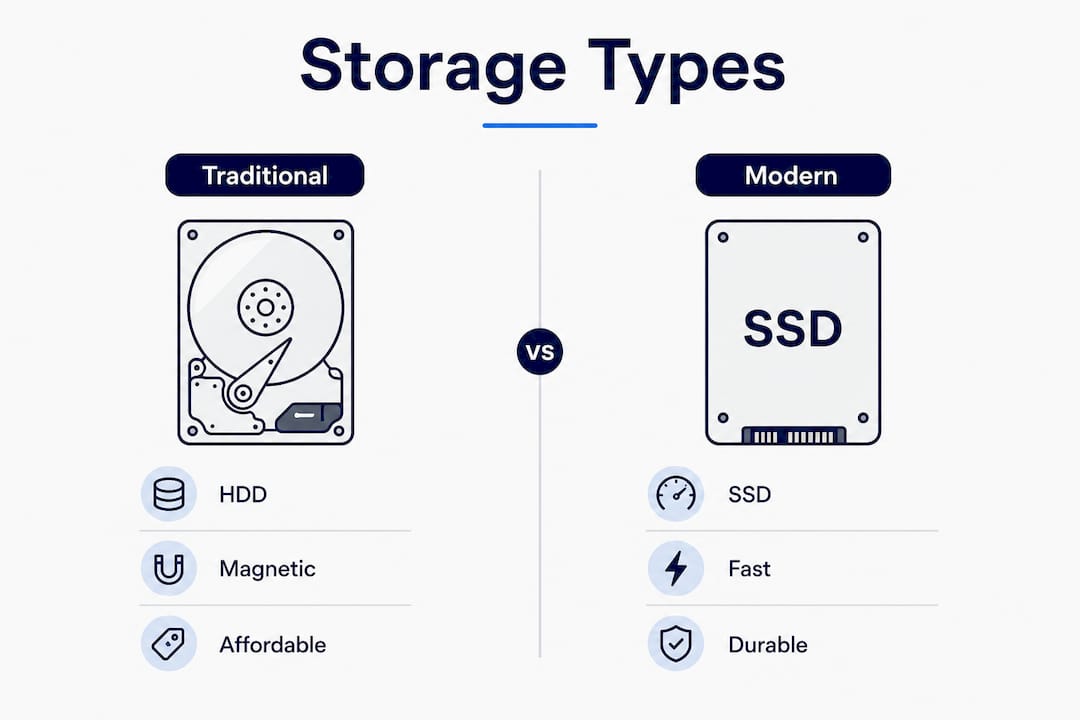
Traditional mechanical hard drives (HDDs) use spinning magnetic platters to read and write data. They are cheap and offer large capacities, but their mechanical nature makes them slow and prone to failure from physical wear. Solid-state drives (SSDs) have no moving parts. They read and write data electronically, making them significantly faster and more reliable than HDDs.
NVMe SSDs go further. They connect directly to a server’s CPU via the PCIe bus rather than through the older SATA interface that standard SSDs use. NVMe SSD storage delivers the lowest latency and highest throughput of any current server storage technology. That speed advantage is most visible on database-heavy sites like WordPress blogs, WooCommerce stores, and membership platforms.
| Storage type | Speed | Durability | Best use case |
|---|---|---|---|
| HDD | Slow | Low (moving parts) | Large archive storage |
| SATA SSD | Fast | High | General shared hosting |
| NVMe SSD | Very fast | Very high | Dynamic sites, e-commerce |
Faster storage directly supports better SEO because search engines factor page load time into rankings. A site hosted on NVMe storage loads faster, reduces bounce rates, and delivers a better user experience. That combination boosts both SEO and conversions in ways that raw gigabyte counts never will.
Pro Tip: When comparing hosting plans, prioritize storage technology over storage size. A plan with 10 GB of NVMe SSD storage will outperform a plan with 100 GB of HDD storage for almost every real-world website.
How much disk space does your website actually need?
Sizing your disk space correctly from the start prevents the headache of migrating to a new host later. Choosing insufficient disk space often forces a hosting migration, which carries technical risks and potential downtime. Getting the estimate right upfront is far easier than fixing it under pressure.
Here is a practical way to size your storage needs:
- Inventory your core files. Count your HTML, CSS, JavaScript, and theme files. For most sites, this totals 50–200 MB.
- Estimate your media library. Images and videos are the biggest variable. A portfolio site with 200 high-resolution photos might use 1–2 GB. An e-commerce store with 500 product images could use 3–5 GB.
- Add your database size. A WordPress database for a standard business site typically runs 50–200 MB. Large WooCommerce stores with thousands of orders can reach 1 GB or more.
- Factor in email storage. If your hosting plan includes business email, each active mailbox can accumulate hundreds of megabytes over time. A team of 10 people with active inboxes could add 5–10 GB.
- Add a buffer for backups and growth. Multiply your total estimate by 1.5 to 2. Backups duplicate your data, and websites grow. That buffer prevents you from hitting your limit within six months.
Monitoring disk space usage regularly through your hosting control panel keeps you ahead of problems. Most control panels display a live usage meter. Set a personal alert at 80% capacity so you have time to clean up old files or upgrade your plan before hitting the ceiling.
Common misconceptions about disk space hosting
The biggest myth in hosting is “unlimited disk space.” Providers use this phrase as a marketing term, but unlimited disk space plans enforce limits through Fair Use Policies rather than a hard gigabyte cap.
Fair Use Policies in unlimited hosting plans restrict usage through CPU limits, RAM allocations, inode counts, and database size caps. If your account consumes too many server resources, the provider can suspend or throttle your service, regardless of how much raw disk space you appear to have.
Inode limits are particularly misunderstood. An inode is a data structure the server uses to track each individual file. A shared hosting account might allow 250,000 inodes. A WordPress site with thousands of plugin files, cache files, and media attachments can hit that inode ceiling long before it hits any gigabyte limit. The result is the same: your site stops accepting new files.
Content quality and site architecture matter more to your long-term hosting needs than raw storage numbers. A well-organized site with compressed images and a clean database uses a fraction of the space of a bloated one.
Pro Tip: Always read the Terms of Service and Acceptable Use Policy before signing a hosting contract. Search for the words “inode,” “CPU,” and “fair use” to understand the real limits on any unlimited plan.
How disk space fits into different hosting plan types
Different hosting plan types allocate disk space in fundamentally different ways. The right plan depends on how much control, flexibility, and raw capacity your website requires.
-
Shared hosting. Multiple websites share the same server and its disk space. Each account receives a fixed quota, typically ranging from a few gigabytes to tens of gigabytes. Shared hosting suits small business sites, blogs, and portfolio sites that stay within predictable storage needs. Dasabo’s shared hosting plans use NVMe SSD storage, which gives shared-plan customers faster performance than most entry-level plans in the market.
-
Virtual Private Server (VPS) hosting. A VPS gives you an isolated partition of a physical server with dedicated disk space. You do not share your storage quota with other accounts. VPS plans suit growing businesses, developers, and sites with moderate to high traffic that need predictable, dedicated resources.
-
Dedicated servers. A dedicated server gives you full control over an entire physical machine and all its storage. You configure the disk setup yourself, choosing RAID configurations for redundancy or NVMe arrays for speed. Dedicated servers suit large e-commerce platforms, high-traffic media sites, and applications with strict data isolation requirements.
-
Cloud hosting. Cloud hosting stores your data across multiple servers in a distributed network. Storage scales dynamically. You pay for what you use, and capacity expands without migrating to a new server. Cloud hosting suits sites with unpredictable traffic spikes or rapid growth.
Understanding how resource sharing works in hosting helps you choose the right plan tier before you outgrow your current one.
Key Takeaways
Disk space hosting is the storage foundation of every website, and the quality of that storage matters as much as the quantity.
| Point | Details |
|---|---|
| Storage type beats storage size | NVMe SSD hosting outperforms large HDD allocations for speed, SEO, and reliability. |
| Most sites need less than 3 GB | Business card and standard business sites rarely exceed 2–3 GB of actual disk usage. |
| Unlimited plans have real limits | Fair Use Policies cap usage through inodes, CPU, and RAM, not just gigabytes. |
| Size with a buffer | Multiply your estimated storage needs by 1.5–2 to account for backups and growth. |
| Plan type shapes your flexibility | VPS and cloud hosting offer more disk space control than shared plans as your site grows. |
Why I stopped worrying about gigabytes and started asking better questions
After years of watching businesses pick hosting plans, I can tell you the most common mistake: choosing a plan based on the biggest storage number at the lowest price. It feels logical. It almost always backfires.
The sites I have seen go down at the worst possible moment were not running out of gigabytes. They were hitting inode limits from thousands of unmanaged cache files, or they were on HDD-based plans where database queries took three seconds to return. The storage number on the plan page was irrelevant.
What actually matters is this: how fast does the storage read and write, and does the plan give you room to grow without a painful migration? NVMe SSD storage answers the first question. Choosing a plan one tier above your current needs answers the second.
I also think people underestimate the SEO cost of slow storage. A site that loads in 4 seconds on an HDD plan and 1.5 seconds on an NVMe plan is not just a better experience. It ranks differently. That gap compounds over months.
My honest advice is to treat disk space like you treat office space. You do not rent the biggest building you can find. You rent what you need now, with room to expand, in a building with reliable infrastructure. The square footage is secondary to whether the lights stay on and the elevators work.
— Alex
Dasabo’s hosting plans for every storage need
Dasabo manages over 5,000 websites and serves more than 20,000 customers across shared, VPS, and managed WordPress hosting plans. Every plan runs on NVMe SSD storage, which means you get the speed and reliability that most entry-level providers reserve for premium tiers. Whether you run a personal portfolio that sits comfortably under 1 GB or a growing e-commerce store pushing toward 20 GB, Dasabo’s web hosting plans scale to match your real storage needs. The 99.9% uptime guarantee and 24/7 support mean that when your disk space questions turn into real decisions, someone is there to help you get it right.
FAQ
What is disk space in web hosting?
Disk space in web hosting is the total storage a server allocates for your website’s files, databases, emails, and backups. Every component of your site counts against this quota.
How much disk space does a typical website need?
Most standard business websites use 2–3 GB of disk space. Small portfolio or business card sites often stay under 500 MB, while e-commerce stores with large media libraries can require significantly more.
Is unlimited disk space actually unlimited?
No. Unlimited disk space plans enforce usage through Fair Use Policies that cap CPU, RAM, and inode counts. Hitting those limits stops your site from accepting new files, regardless of your gigabyte allowance.
Does storage type affect my website’s SEO?
Yes. NVMe SSD storage reduces page load times, which search engines factor into rankings. Faster storage directly improves user experience and can lift your position in search results.
What happens when I run out of disk space?
When disk space fills up, your server stops accepting new data. The consequences include failed file uploads, bounced emails, and in severe cases, full website unavailability until space is freed or your plan is upgraded.