




Client hosting management is the active administration of web hosting environments on behalf of clients, covering server performance, security, billing, and ongoing support. If you run a small business or work independently with clients who need websites, understanding this discipline separates you from providers who simply sell server space and disappear. The industry term for this practice is “managed hosting services,” and it applies whether you oversee one client site or fifty. Dasabo manages over 5,000 websites with a 99.9% uptime guarantee, which shows what professional hosting management looks like at scale.
What is client hosting management and why does it matter?
Client hosting management is defined as the organized process of overseeing hosting accounts, infrastructure, backups, security, and billing for clients rather than for your own websites. The distinction matters because you carry responsibility for someone else’s online presence. A client’s site going down at 2 a.m. on a Friday is your problem, not just theirs.
Web hosting management differs from simply buying a hosting plan. It requires monitoring, proactive maintenance, and clear communication about who handles what. For individuals and small business owners, this clarity prevents costly misunderstandings. A freelance web designer who builds a site and hands over login credentials has not done hosting management. A provider who monitors uptime, applies security patches, and handles renewals has.

The scope of client server management typically covers four areas: infrastructure oversight, security hardening, performance monitoring, and client communication. Each area demands consistent attention. Neglecting any one of them creates risk for both you and your client.
What are the main models of client hosting management?
Three models define how hosting management works in practice. Each carries different implications for control, billing, and responsibility.
Client-owned hosting means the client holds the account directly with a hosting provider. You receive access credentials to manage their environment, but the billing relationship stays between the client and the host. This model gives clients maximum control and ownership. Your access can be revoked at any time, which limits your ability to guarantee service quality.
Agency-managed hosting under a reseller account means you hold a master account with a hosting provider and provision individual client accounts beneath it. You control the environment, set pricing, and handle billing. Clients interact with you, not the underlying provider. This model suits small agencies and freelancers who want centralized control without owning physical servers.
Fully managed hosting means the agency or provider owns the infrastructure entirely and delivers a complete service package. Managed hosting services actively monitor server performance, security events, and backup status, responding before clients notice issues. This model commands the highest price and delivers the most value.
| Model | Client control | Billing owner | Support responsibility |
|---|---|---|---|
| Client-owned | High | Client | Shared or client-side |
| Reseller managed | Medium | Agency | Agency |
| Fully managed | Low | Agency or platform | Agency or platform |
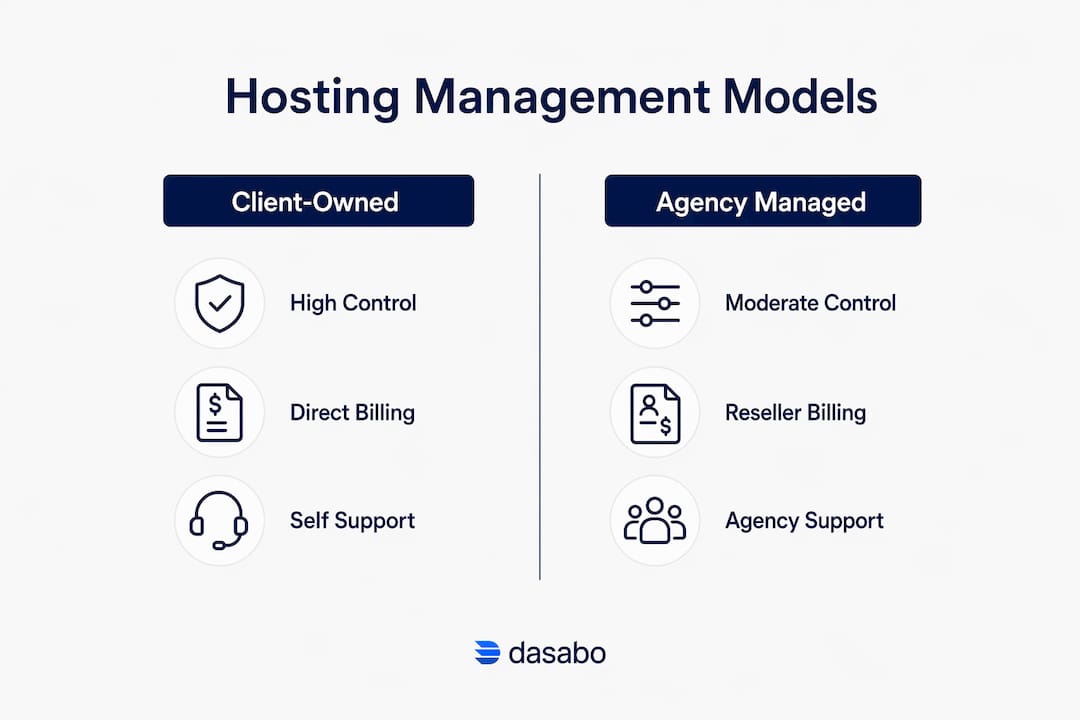
The right model depends on your client base and your capacity to deliver support. Reseller and fully managed models both allow you to build recurring revenue, which client-owned hosting does not.
What benefits do managed client hosting services offer beyond basic server space?
Clients rarely value mere server space. Bundling hosting with maintenance, backups, monitoring, and support shifts the client’s perception from a commodity purchase to a high-value operational service. That shift changes how clients think about price and retention.
The concrete benefits of managed client hosting solutions include:
- Uptime reliability. A guaranteed uptime percentage, such as Dasabo’s 99.9% commitment, gives clients confidence their site stays live during peak traffic.
- Security hardening. Firewall configuration, malware scanning, and regular security patches reduce vulnerability to attacks. Proactive security is the single biggest differentiator between commodity hosting and managed services.
- Performance monitoring. Managed providers track server load, page speed, and resource usage continuously. Problems get caught before they affect visitors.
- Automated backups and recovery. Hosting management includes ongoing backups and detailed disaster recovery plans to ensure fast recovery from failures or breaches. Clients expect minimal downtime and data loss during incidents.
- Simplified billing. One monthly invoice covering hosting, maintenance, and support is easier for clients to approve than multiple separate charges.
Pro Tip: Frame your hosting service as an operational guarantee, not a technical product. Tell clients they are paying for “your site stays live, secure, and fast” rather than “250 GB of NVMe SSD storage.” The first statement creates perceived value; the second invites price comparison.
Successful agencies shift from selling hosting as a commodity to including it in maintenance retainers, emphasizing reliability and security over raw server specs. This strategy improves client retention because clients stop shopping around for cheaper server space.
What are best practices for client hosting management?
Effective hosting management best practices follow a clear structure. Skipping any step creates gaps that surface at the worst possible moment.
-
Separate accounts for each client. Maintaining separate hosting accounts for each client preserves security boundaries and eases management, even when centralized under your control. If one client’s site gets compromised, the breach stays contained.
-
Define responsibilities in writing. A service agreement should specify who handles uptime monitoring, security patches, plugin updates, and billing disputes. Vague agreements create conflict when something breaks.
-
Implement automated backups from day one. Daily backups stored off-server protect against both technical failures and human error. Test your restore process quarterly so you know it works before you need it.
-
Set up uptime monitoring. Free and paid monitoring tools send alerts when a site goes down. You should know about an outage before your client calls you.
-
Use billing automation. Platforms like WHMCS automate billing, provisioning, and support ticketing, freeing you to focus on client service rather than invoice chasing. Automation reduces overhead and improves response times.
-
Document every environment. Keep a record of each client’s hosting credentials, DNS settings, SSL certificate renewal dates, and software versions. This documentation saves hours when something needs urgent attention.
Pro Tip: Build a hosting management checklist and run it monthly for every client account. Check backup logs, SSL expiration dates, software update status, and uptime reports. Thirty minutes of monthly review prevents the majority of client-facing emergencies.
Optimizing cloud infrastructure for performance and cost also matters as your client base grows. Hosting environments that made sense for a five-page brochure site may not handle an e-commerce store with 500 daily visitors.
What challenges arise in client hosting management?
Managing hosting for clients introduces friction points that purely technical hosting does not. Knowing them in advance lets you build systems that handle them before they become problems.
-
Clients who want to own their hosting. Some clients, particularly those with compliance requirements, insist on holding their own hosting accounts. Clients preferring to own their hosting accounts for compliance are often reassured to hand management over when agencies provide clear legal agreements defining responsibilities and proactive security patching. A well-written service agreement resolves most objections.
-
Balancing control with transparency. Clients want to feel informed without being overwhelmed by technical details. Monthly reports covering uptime percentage, backup status, and any security events satisfy this need without requiring clients to understand server architecture.
-
Security and compliance concerns. Regulations like GDPR and HIPAA impose specific data handling requirements. Know which regulations apply to each client’s industry before you choose a hosting environment for them.
-
Scaling support as your client base grows. Managing three client sites manually is feasible. Managing thirty requires systems. Invest in monitoring dashboards and ticketing tools before you hit capacity, not after.
-
Contractual gaps. The most common source of client disputes in hosting management is undefined responsibility. Who pays when a third-party plugin causes a site crash? Who handles domain renewals? Answer these questions in your service agreement before signing a client.
Reviewing IT support and uptime management practices gives small business owners a useful framework for structuring their own hosting oversight processes.
How do you start managing hosting for clients effectively?
Getting client hosting management right from the start requires a structured approach. These steps apply whether you are onboarding your first client or rebuilding a disorganized existing setup.
-
Audit each client’s current hosting setup. Identify their hosting provider, plan type, renewal dates, DNS configuration, and any existing backups. This audit reveals gaps immediately.
-
Choose a hosting model that fits your service capacity. If you cannot commit to 24/7 monitoring, a reseller model with a managed provider like Dasabo gives you infrastructure support while you handle client relationships.
-
Establish security protocols before migration. Configure SSL certificates, set up firewalls, and enable malware scanning on day one. Security retrofitted after launch is always harder than security built in from the start.
-
Onboard clients with a written agreement. Cover hosting responsibilities, support response times, billing terms, and data ownership. Both parties should sign before any site migration begins.
-
Set up monitoring and reporting. Automated uptime alerts and monthly performance reports keep you informed and give clients visible proof of the value you deliver.
| Task | Timing | Purpose |
|---|---|---|
| Hosting audit | Before onboarding | Identify gaps and risks |
| Security setup | Day one | Prevent vulnerabilities from launch |
| Backup configuration | Day one | Protect against data loss |
| Uptime monitoring | Week one | Enable proactive response |
| Monthly reporting | Ongoing | Demonstrate service value to clients |
The goal is a repeatable process you can apply to every new client without reinventing it each time. Consistency in how to manage hosting clients is what separates a professional service from ad-hoc technical support.
Key Takeaways
Client hosting management delivers the most value when it shifts from selling server space to guaranteeing uptime, security, and performance through clear agreements and proactive monitoring.
| Point | Details |
|---|---|
| Define your hosting model | Choose client-owned, reseller, or fully managed based on your capacity and service goals. |
| Separate client accounts | Keep each client in its own account to contain security risks and simplify management. |
| Bundle services, not specs | Sell uptime, security, and backups as a package rather than raw storage or bandwidth. |
| Automate billing and monitoring | Use platforms like WHMCS and uptime tools to reduce manual overhead as your client base grows. |
| Put responsibilities in writing | A signed service agreement prevents disputes over who handles patches, renewals, and incidents. |
Why most hosting management advice misses the real problem
The standard advice on how to manage hosting clients focuses almost entirely on tools and technical setup. Pick the right control panel, automate your billing, monitor your uptime. All of that is correct, but it skips the harder problem: most clients do not understand what they are paying for, and most providers do not explain it.
I have seen small agencies lose long-term clients not because their hosting failed, but because the client did not perceive any value in what they were paying monthly. The site was always up. Backups ran silently. Security patches applied without drama. The client saw a recurring charge and eventually questioned it. The agency had no story to tell because they had never built one.
The fix is not technical. It is communicative. Send a monthly report. Show the client that their site had 99.9% uptime last month, that three malware scans came back clean, and that their backup restored successfully in a test. Make the invisible work visible. Clients who see proof of value do not cancel.
The shift from commodity hosting to managed services is real, and it is worth pursuing. But the shift only sticks when clients understand what changed. Build that communication into your process from day one, and your retention numbers will reflect it.
— Alex
Dasabo’s approach to client hosting management
Running hosting for multiple clients gets complicated fast. Dasabo simplifies that process with managed hosting plans built for individuals and small business owners who need reliable infrastructure without a full-time server team.

Dasabo’s platform combines LiteSpeed caching, NVMe SSD storage, and a 99.9% uptime guarantee with 24/7 customer support. Over 20,000 satisfied customers rely on Dasabo to keep their sites fast and secure. Whether you are managing your own site or overseeing hosting for a roster of clients, Dasabo gives you the performance foundation and expert support to deliver a professional service without the overhead of managing physical servers yourself.
FAQ
What is client hosting management in simple terms?
Client hosting management is the ongoing administration of web hosting environments on behalf of clients, including uptime monitoring, security, backups, and billing. It goes beyond providing server space to actively maintaining and supporting each client’s online presence.
What is the difference between shared hosting and managed hosting?
Shared hosting places multiple sites on one server with no active management included. Managed hosting adds proactive monitoring, security patching, backups, and support as part of the service.
How do I separate client hosting accounts safely?
Maintain a distinct hosting account for each client, even if all accounts sit under your reseller master account. Account-level separation is best practice to safeguard client data and isolate issues between sites.
What tools help automate client hosting billing?
WHMCS is the most widely used platform for automating hosting billing, account provisioning, and support ticketing. Automation reduces manual work and speeds up client invoicing.
How do I convince clients to let me manage their hosting?
Provide a clear service agreement that defines your responsibilities for uptime, security, and backups. Clients relinquish hosting ownership when agencies demonstrate proactive security and disaster recovery capabilities backed by written agreements.