



Configuring a payment gateway with secure hosting means building a PCI DSS-compliant infrastructure that encrypts cardholder data, isolates your payment environment, and monitors for threats continuously. Every e-commerce business that accepts card payments must configure payment gateway secure hosting correctly, or face penalties ranging from $5,000 to $100,000 per violation. The standard governing this is PCI DSS 4.0.1, updated in 2026, which tightened requirements around script integrity, multi-factor authentication, and network segmentation. Getting this right protects your customers and keeps your business legally operational.
What are the critical hosting requirements for secure payment gateway configuration?
Your hosting environment is the foundation of payment security. A weak hosting setup undermines every other security measure you put in place.
Active SSL/TLS certificates are non-negotiable. All e-commerce sites processing payments must maintain an active TLS 1.2 or higher certificate to encrypt communication between your customer’s browser and your server. Most modern hosts provide free certificates through Let’s Encrypt, so there is no excuse for running an unencrypted checkout.

Network segmentation protects your most sensitive data. Isolating the Cardholder Data Environment (CDE) from the rest of your network limits the blast radius of any breach. A properly segmented network places firewalls between your public-facing web servers, your internal systems, and the CDE, allowing only authorized protocols and ports to pass through.
The payment gateway hosting requirements for a secure setup include:
- TLS 1.2+ certificate active and auto-renewing on all payment pages
- Web Application Firewall (WAF) to filter malicious HTTP traffic before it reaches your application
- DDoS protection at the network level to keep your checkout available during attacks
- Two-factor authentication (2FA) on all hosting control panel and server access accounts
- Regular vulnerability scanning with quarterly external scans and prompt patching of discovered issues
- Automated backups stored separately from your live environment
Pro Tip: When evaluating hosting plans, ask specifically whether the provider manages TLS renewals automatically. An expired certificate during peak sales season is a preventable disaster.
How to implement PCI DSS 4.0.1 compliance in your payment gateway setup
PCI DSS 4.0.1 is the current version of the Payment Card Industry Data Security Standard, and it applies to every merchant that accepts, processes, or transmits card data. Compliance is not optional. Merchants are divided into four levels based on transaction volume, with Level 4 merchants processing fewer than 20,000 transactions annually and Level 1 merchants processing more than 6 million. Each level carries different audit requirements.
The most practical compliance steps for small and medium businesses follow a clear sequence:
-
Reduce your PCI scope first. Use hosted payment pages or redirect-based checkouts so cardholder data never touches your server. Merchants using redirect solutions qualify for the simpler SAQ A self-assessment, which dramatically cuts compliance complexity.
-
Implement script integrity monitoring. PCI DSS Requirement 6.4.3 mandates that you maintain a documented inventory of every script running on your payment pages and perform weekly tamper detection checks to catch web-skimming attacks. This applies whether you use iframes, redirects, or direct integrations.
-
Enforce MFA on all CDE access. As of march 31, 2025, multi-factor authentication is mandatory for every non-console access point to the Cardholder Data Environment. This expanded from administrative accounts only to all accounts.
-
Run quarterly vulnerability scans. Use an Approved Scanning Vendor (ASV) to scan your external network perimeter every quarter. Pair this with annual penetration testing to find weaknesses before attackers do.
-
Select the correct Self-Assessment Questionnaire. SAQ A applies to fully outsourced card processing. SAQ A-EP applies if your site loads payment scripts. SAQ D applies to merchants storing card data directly. Choosing the wrong SAQ creates false compliance confidence.
The most dangerous compliance mistake is assuming that using an iframe payment form removes your responsibility for script integrity. PCI DSS 4.0 requires full script inventories and weekly integrity checks regardless of integration method. Documented assurance from your payment provider does not replace your own monitoring obligation.
What are the practical steps to configure a payment gateway securely?
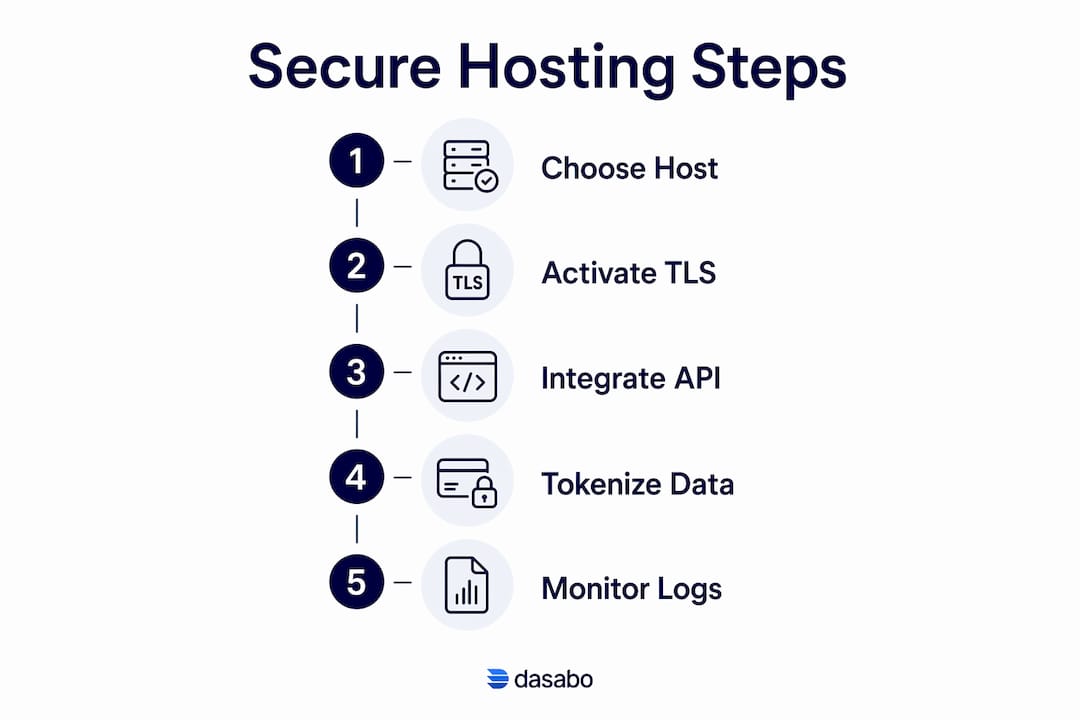
Secure payment processing requires deliberate choices at every stage, from picking your host to writing your first API call. Here is the sequence that works.
Step 1: Choose a PCI-compliant hosting provider
Select a host that explicitly supports PCI DSS-aligned infrastructure. Look for managed TLS certificates, built-in WAF, server-level firewalls, and documented security patching schedules. Dasabo provides hosting plans built for this kind of environment, with 99.9% uptime and managed security features that reduce the operational burden on your team.
Step 2: Activate and verify your SSL/TLS certificate
Install your TLS certificate before connecting any payment gateway. Verify the certificate covers your full domain, including any subdomain where checkout occurs. Test the configuration using SSL Labs’ free grading tool to confirm you score at least an “A” rating.
Step 3: Integrate your payment gateway using API-first or hosted field methods
API-isolated gateway architecture separates payment processing from your core website systems. This reduces PCI scope and makes it easier to switch providers or expand to multiple regions later. Hosted payment fields load directly from the payment provider’s servers, keeping raw card numbers off your infrastructure entirely.
Step 4: Implement tokenization
Tokenization and PSP token vaults replace the primary account number (PAN) with a non-sensitive token your system stores instead. This means your database never holds actual card data, which shrinks your PCI scope significantly and protects customers if your database is ever compromised.
Step 5: Set up monitoring and logging
| Security control | What to monitor | Recommended frequency |
|---|---|---|
| TLS certificate validity | Expiry date and cipher strength | Weekly |
| Script integrity checks | Payment page script inventory | Weekly |
| Access logs | Failed login attempts, unusual access patterns | Daily |
| Vulnerability scans | External network perimeter | Quarterly |
| Penetration testing | Full application and network | Annually |
Pro Tip: Set automated alerts for TLS certificate expiry at 30 days and 7 days out. Waiting for a browser warning from a customer means you have already lost sales.
Which common mistakes should small businesses avoid when configuring payment gateways?
Most payment security failures come from a small set of repeated errors. Knowing them in advance saves significant time and money.
-
Assuming iframes transfer all compliance responsibility. Merchants using iframe-based payment forms must still maintain script inventories and perform weekly integrity checks. The mistaken belief that iframes fully shift responsibility leads directly to compliance failures under PCI SSC FAQ 1588.
-
Skipping software and plugin updates. Failure to patch CMS plugins and payment integrations is one of the most common causes of cardholder data breaches. Set automatic updates where possible, and review pending updates weekly for anything touching your checkout flow.
-
Failing to segment your network. Running your payment environment on the same network as your general business systems expands your PCI audit scope to cover everything. Proper segmentation limits what auditors must review and limits what attackers can reach.
-
Weak or missing MFA. Many small businesses enable MFA on their email but not on their hosting control panel or payment gateway dashboard. Every access point to the CDE requires MFA without exception.
-
No security monitoring after go-live. Configuring secure payment options at launch and then ignoring security logs is a common pattern. Breaches often go undetected for weeks because nobody is watching the alerts.
Pro Tip: Run a free external vulnerability scan on your domain before you launch any payment integration. Many hosting providers include this in their plans. Finding an open port or misconfigured header before launch costs nothing. Finding it after a breach costs everything.
Key Takeaways
Securely configuring a payment gateway requires PCI DSS-compliant hosting, active TLS encryption, network segmentation, tokenization, and continuous script integrity monitoring working together.
| Point | Details |
|---|---|
| PCI DSS compliance is mandatory | All card-accepting merchants must comply, with penalties up to $100,000 for violations. |
| Hosted payment pages reduce scope | Redirect-based checkouts qualify merchants for SAQ A, the simplest compliance path. |
| Script integrity monitoring is required | PCI DSS 4.0.1 Requirement 6.4.3 mandates weekly checks on all payment page scripts. |
| MFA covers all CDE access | As of march 31, 2025, MFA applies to every non-console access point, not just admin accounts. |
| Tokenization eliminates stored card data | PSP token vaults replace raw card numbers, shrinking your PCI scope and breach exposure. |
What I’ve learned about payment security that most guides skip
The conversation around payment gateway security tends to focus on the setup moment. Get your SSL certificate, pick a gateway, check the PCI box. What gets far less attention is the ongoing maintenance reality that small businesses face after launch.
The shift to PCI DSS 4.0.1 is genuinely significant for small and medium businesses. The script integrity requirement alone catches most merchants off guard. They assume that because they are using a third-party payment provider, the provider handles everything. That assumption is wrong, and it is now codified in the standard.
The trade-off between hosted and self-hosted payment methods is real. Hosted redirect solutions are simpler to comply with, but they hand off the checkout experience to another company’s interface. API-first integrations give you full control over the user experience and support multi-provider strategies, but they expand your compliance scope and require more technical discipline. Neither is universally better. The right choice depends on your technical capacity and how much you value checkout customization.
The security-first mindset matters more than any single technical fix. A business that treats compliance as a checklist will always be one update cycle behind the attackers. A business that builds security into its hosting selection, its deployment process, and its weekly operations will handle the inevitable changes in PCI DSS without a crisis.
— Alex
Dasabo hosting for secure payment gateway environments
Running a payment-ready store requires a hosting environment that handles the technical security baseline so you can focus on selling.
Dasabo’s secure hosting plans include managed TLS certificates, server-level firewalls, and infrastructure built to support PCI DSS-aligned configurations. With NVMe SSD storage, LiteSpeed caching, and a 99.9% uptime guarantee, Dasabo keeps your checkout fast and available. The 24/7 support team handles security patching and server-level configurations, which removes a significant operational burden for small and medium businesses. Over 20,000 customers and 5,000 managed websites reflect the reliability behind the platform. If you are building or migrating a payment-enabled store, Dasabo’s environment is built to support the compliance and performance requirements that modern e-commerce demands.
FAQ
What does PCI DSS compliance require for my hosting setup?
PCI DSS requires active TLS 1.2+ certificates, network segmentation isolating the Cardholder Data Environment, MFA on all CDE access, and quarterly vulnerability scans. Your hosting provider must support these controls, and you are responsible for verifying they are active.
Does using a hosted payment page mean I don’t need to worry about PCI compliance?
Using a hosted payment page qualifies you for the simpler SAQ A self-assessment, but it does not eliminate compliance obligations. You still must monitor scripts on your payment pages weekly and maintain documented inventories per PCI DSS Requirement 6.4.3.
What is tokenization and why does it matter for payment security?
Tokenization replaces a customer’s actual card number with a non-sensitive token stored in a PSP vault. Your server never holds raw card data, which reduces your PCI scope and limits the damage if your database is ever breached.
How do I know if my hosting provider is PCI-compliant?
Ask your provider directly whether their infrastructure supports PCI DSS-aligned configurations, including managed TLS, WAF, firewall segmentation, and documented patching schedules. A reputable provider will supply documentation or a shared responsibility matrix.
What is the difference between SAQ A and SAQ D?
SAQ A applies to merchants who fully outsource card processing through hosted redirect solutions where cardholder data never touches their servers. SAQ D applies to merchants who store, process, or transmit card data directly and carries significantly more requirements.